January 26th, 2013
Today I had this need to get a list of WHM Accounts using one of its APIs. I have never used it before but it was really simple to use. It returns an xml file that you can manipulate using your prefered language and store it in database for reporting etc.
Here is what you need to do, connect to your server using SSH and run the following command
wget http://your-server-ip:2086/xml-api/listaccts --http-user=myuser --http-password=mypass --output-document=listaccts.xml
Replace your-server-ip with your WHM’s ip and myuser/mypass with the actual WHM/CPanel password. The resultant xml file will be saved as “listaccts.xml” in the same directory as you ran the command in.
If you feel a bit insecure running these command over SSH or don’t have shell access to the server then visit this page on your browser and save it as an xml file.
http://your-server-ip:2086/xml-api/listaccts
(again, substitute your-server-ip with the actual WHM ip address, substitute HTTP with HTTPS and port to 2087 for HTTPS if enabled on your server / FQDN)
Enjoy!
January 24th, 2013
Yet another infographic. Well, Infographics are much better way to grasp the information, especially if they’re well made. This cool infographic from Tech King lists out some of the most important events in the history of Domain Names.
Pakistan ranks 55th with only 46 thousand domain names in Top countries for domain registration.
Read the rest of this entry
December 24th, 2012
Yet another infographic. Well, Infographics are much better way to grasp the information, especially if they’re well made. This cool infographic from Silver Oak lists out some of the most important events in the history of the internet gaming.
Read the rest of this entry
November 24th, 2012
MarkMonitor Inc, USA based company who is responsible for over 110 domains including google.com.pk, microsoft.com.pk, paypal.pk, domain control panel hacked, last night and some sites are still down as of (24th November, 2012)
Google Pakistan’s home page (google.com.pk) is “hacked” by Turkish hackers putting a message which says “Pakistan Downed”. Paypal site is still down and showing this:-
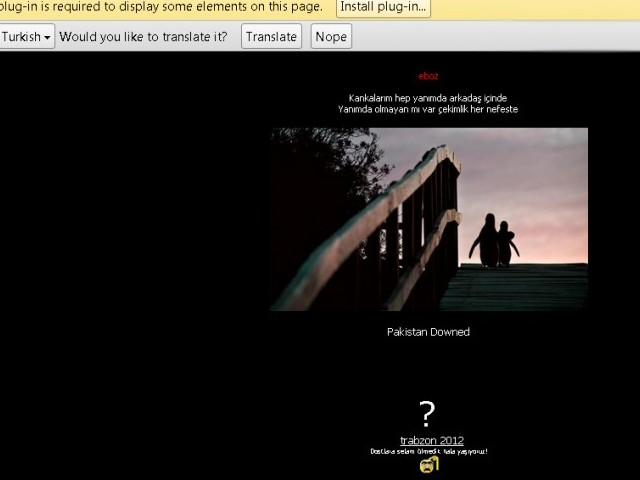
WHOIS record of those hostings point to some free hosting service as DNS providers:-
dns1.freehostia.com
dns2.freehostia.com
List of sites affected:-
November 8th, 2012
Ever wanted FTP backups and automation for keeping backups of important file on off-peak time. I always love automation, so machines can do things automatically and help humans 🙂 Read the rest of this entry
October 16th, 2012
Physical access is everything, it is almost impossible to prevent machine access/password break if somebody else got physical access to some Linux machine.
But there are some steps you can make somebody work hard to access the machine physically (provided they have good knowledge of Linux). Read the rest of this entry