Recently when my servers HDD dead, data center installed a new HDD keeping orginal HDD as secondary so that i can copy data back to new HDD.
I tried to mount the HDD normal way, but got the error:-
[root@server78 ~]# fdisk -l /dev/hda

 Disk /dev/hda: 160.0 GB, 160041885696 bytes
 255 heads, 63 sectors/track, 19457 cylinders
 Units = cylinders of 16065 * 512 = 8225280 bytes

    Device Boot      Start         End      Blocks   Id  System
 /dev/hda1   *           1          13      104391   83  Linux
 /dev/hda2              14       19457   156183930   8e  Linux LVM

 [root@server78 ~]# mount /dev/hda2 /tmp/mnt
 mount: /dev/hda2 already mounted or /tmp/mnt busy
The old drive is lvm. you were trying to mount it like it was an ext3 filesystem. I have listed what i did below so you can see it.
Now we need to check the old disk is using LVM ? type:-
[root@server78 ~]# pvs
PV         VG         Fmt  Attr PSize   PFree
/dev/hda2  VolGroup01 lvm2 a-   148.94G 32.00M
/dev/hdb2  VolGroup00 lvm2 a-   114.94G 96.00M
So now we know our second hard disk VolumeGroup name is “VolGroup00”, now we can mount it like:-
[root@server78 ~]# mount /dev/VolGroup01/LogVol00 /mnt
That’s it, you can see the folders in /mnt/, Edit/copy as you like.
I usually use “setup” to do the firewall setup for permissive or not and setting of SELINUX, etc….
But on a minimal install you don’t have access to setup command, which is my favorite
[root@tel ~]# setup
-bash: setup: command not found
So how to install it in minimal install ?
yum –y install setuptool
yum –y install system-config-network*
yum -y install system-config-firewall*
yum –y install system-config-securitylevel-tui
yum –y install system-config-keyboard
(thanks JoVeN for spell mistake)
For system services utility install ntsysv (as Perico suggested in the user comments)
yum -y install ntsysv
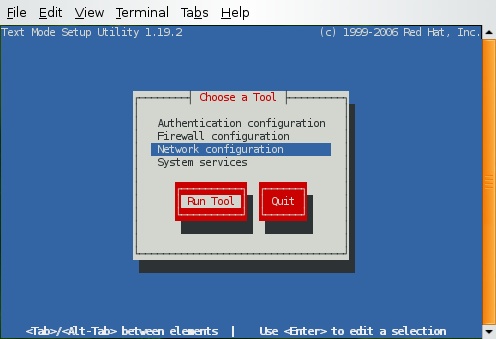
That’s it….!! Enjoy
A subset mirror of the Google Libraries API CDN meant to be served from your local development machine when internet access is lacking. This will increase your overall browsing experience. (for sites like wordpress, Blogspot, Google products etc)

Read the rest of this entry
Yet another infographic. Well, Infographics are much better way to grasp the information, especially if they’re well made. This cool infographic from OnlineSchool lists out some of the most important events in the history of the internet.

If you ever wanted to download the rpm package instead of installing it with yum ! you can do that with ease, that is useful when you want to keep backup of some RPMs or want to see what’s inside RPM etc.
Read the rest of this entry
If you recently installed linux (CentOS/Fedora/RedHat) with text mode and now want to use its Graphical GUI which was left unchecked during the installation, you can install it from Internet very easily.
Read the rest of this entry