Archive for the ‘System Administration’ Category
May 25th, 2012
How to mount a partition from a large disk (above 1TB) that has an EFI GPT partition table instead of the conventional MBR (Master Boot Record) partition table. A large disk means a hard drive that is 1 Terabyte or more. EFI stands for Extensible Firmware Interface. GPT is short for Globally Unique Identifier Partition Table.
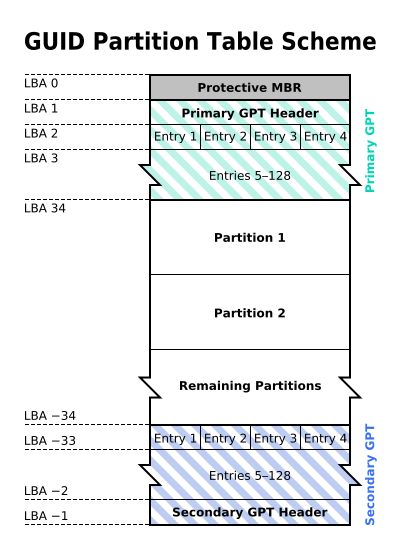
First Step)
Check the kernel was compiled with EFI support. The standard kernel with Ubuntu/Debian/CentOS 5+ comes with EFI support built-in
cat /boot/config-2.6.26-2-686 | grep EFI
(Change the version number with yours in /boot/config-*)
if the kernel was compiled with EFI support if you get these lines:
CONFIG_EFI=y
CONFIG_FB_EFI=y
CONFIG_EFI_VARS=m
CONFIG_EFI_PARTITION=y
Then type
fdisk -l
(to check the device name in /dev)
fdisk -l /dev/sda
(if the device is at sda, replace with the one you saw when you typed fdisk -l)
parted /dev/sda print
Ok we got the filesystem with the above command, now lets mount it!
mkdir /mnt/test
mount -t ext3 /dev/sda2 /mnt/test
(if the file system is ext3, it will be displayed when you type “parted /dev/sda print”, if device is at /dev/sda)
Hope this helps
May 16th, 2012
Recently, in Pakistan many companies have started offering email marketing.
These companies collect email data from various sources, and then start sending emails in bulk.
Majority of these email marketing companies are using Google groups to send emails.
Google groups enables them to build an email database and thru these groups then can send bulk emails.
Many people have complained about being added without their consent and receiving several emails on daily basis. Because of a Ban/unban bug in Google Groups, I myself reported Google to fix that bug, but no response yet from their side.
Here is how you can unsubscribe google groups, and make sure that no one can add you again.
Create an account on Google at : http://accounts.google.com
You can use your company email address to create an account.
Google will send you verification email which you should verify.
Once you create the account, you will see the main dashboard page.
Add as many emails as you want in the same account ( usually the ones which are receiving SPAM mails from Google groups)
Once you have added all the accounts.
Go to dashboard –
At the lower part of the screen there is a link for GROUPS
Click on the link.
On the lower right hand side of the screen, you will find the option for “manage subscription”
Or Open : http://groups.google.com (without logging off, off-course)
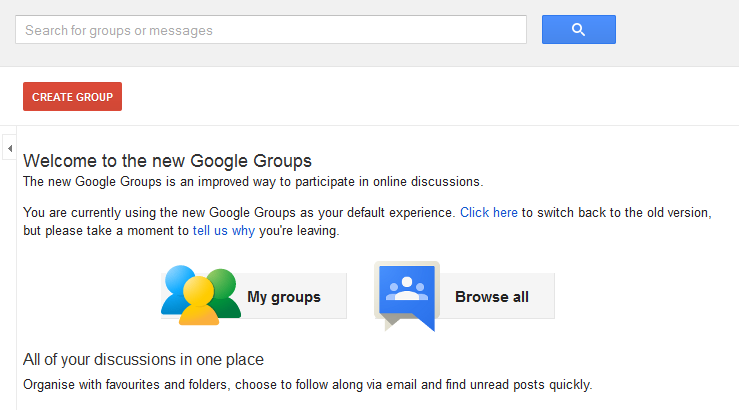
Click on My Groups
Once you click on that link, you will see how many companies / groups have added your emails address.
Click on the group which subscribed you without your permission or you don’t want to be part of that group.

Click “My Membership” from here you can select the option to unsubscribe from that mailing list.
That’s it !!! and now you are done !!
Also, from the User Preference option (click on settings icon  ):-
):-
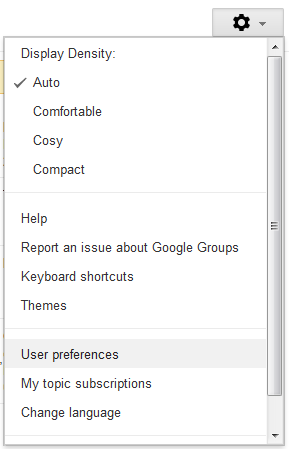
You can enable the option to :
- not to allow any other company to add you
- not to send any other Google group emails.
The Google group spam has been there for a while and many people have been asking me about how to avoid the spam.
I hope this will help to unsubscribe and reduce the spam from Google groups.
May 14th, 2012
You can download a w7 security benchmark from https://benchmarks.cisecurity.org/en-us/?route=downloads.multiform.
In addition to the recommendations there you may want to:
1. Disable Teredo tunneling.
http://www.mydigitallife.info/how-to-disable-tcpipv6-teredo-tunneling-in-vista/.
2. Unbind Client for Microsoft Network and Printer and File sharing from all network adapters.
3. Disable Remote Desktop service.
4. Disable UPNP device host.
5. Disable ISCSI initiator.
6. Disable Computer Browser service.
7. Disable NetBios helper service.
8. Disable RRAS.
9. Disable remote registry service.
10. Move the firewall log from its default location and enable logging of all connections.
11. Enable process tracking in the local security policy.
12. Enable “User Account Control: Only elevate executable(s) that are signed” local security policy.
These are just a few things off the top of my head.
Best to run x64 version of Windows as the host. The script kiddies are still targeting x86.
Of course, these recommendations are also applicable on Vista/XP OS.
You also may want to keep track of your BIOS, NIC and GPU firmware. 🙂
(If you know how)
April 13th, 2012
A Mac developer has posted a tool that detects a Flashback malware infection on Apple's computers. Last week we posted about, More than 600000 Macs system infected with Flashback Botnet. That's slightly more than 1 percent of all 45 million Macs in the world still a relatively small number, but a worrisome one for Mac users, as the tally of infected machines continues to grow
Apple has released new security updates that check for and remove the common Flashback malware variants.
I highly encourage Snow Leopard and Lion users to run Software Update and get the official Apple tool.
http://support.apple.com/kb/HT5247
————————————————————————————————————————————————————————
Flashback checker runs the tests described in the F-Secure Bulletins:
http://www.f-secure.com/v-descs/trojan-downloader_osx_flashback_i.shtml
http://www.f-secure.com/v-descs/trojan-downloader_osx_flashback_k.shtml
Download Flashback Checker 1.0: https://github.com/downloads/jils/FlashbackChecker/FlashbackChecker.1.0.zip
**Note** This utility checks and reports the presence of Flashback malware,
it does _not_ remove it!
No affiliation with F-Secure.
Supports 10.5 and up, PPC and Intel clients.
Juan I. Leon
April 6th, 2012
March 20th, 2012

Firefox 11 now allows you to migrate history, bookmarks and cookies over from rival Chrome. Additionally, you can now sync extensions between your computers. File storage is now in IndexedDB and SPDY protocol support for speedier page loads.
Also new in Firefox 11 is add-on synchronization. For several versions now Firefox Sync fully supported, and now your favorite browser extensions will automatically keep themselves lined up across all your installations.
Another key addition is support for Google’s SPDY protocol.
(The project was first announced way back in 2009 as a way to reduce page load times. It’s still not widely supported despite the promise of a 64% speed boost. A handful of Google’s web apps and services utilize SPDY when it’s available, including Gmail and Google-powered advertising.)
Also you can run your own Sync Server for different PC and Devices
March 15th, 2012
After loosing Norton AntiVirus Corporate Edition source code in 2006, now Symantec is asking its customer to stop usage of Norton/PcAnywhere which was also leaked on Internet.
The security firm said the theft occurred in 2006, compromising 2006-era version of Norton Antivirus Corporate Edition, Norton Internet Security and Norton SystemWorks and most important "pcAnywhere", which could allow malicious users to gain complete access to systems and data very easily.

Also it is intresting to add that the guy who hacked that code also released source code of Indian Spy software
“So far we have discovered within the Indian Spy Program source codes of a dozen software companies which have signed agreements with Indian TANCS programme and CBI”
What does that mean? Indian agencies are doing signed agreements for spying using Symantec/Norton products and others???? must be those agreements are not in favor of Pakistan 🙂
"The headline is very embarrassing to Symantec,"
Anup Ghosh, founder and CEO of Virginian security firm Invincea, told FoxNews.com at the time.
"But this has now become the normal in securities. Every single corporation is susceptible to threats."
hahahah, very funny!!!!
“Symantec recommends disabling the product until Symantec releases a final set of software updates that resolve currently known vulnerability risks,” the company wrote in an online statement about the hacking.
The “The Lords of Dharmaraja”, the hacking group who authored the Pastebin note, has released the code online(last week).
Some security tips from (Ira Victor, a security expert in Nevada):-
1. Do not use a "suite" of security protection from any one firm. A mixture of best of breed security is more secure.
2. Usernames and passwords alone are not enough protection for remote access. A single-use password system makes unauthorized remote access exponentially harder for cyber criminals.
3. Do not run computers in "Administrator" mode. Run systems in "User mode" so that malware does not install automatically.
4. Businesses should deploy application "whitelisting." This will prevent unauthorized malware from running on computers.